Every team that connects an agent to a frontend ends up inventing a private event format to do it. AG-UI (Agent-User Interaction Protocol) is an open, MIT-licensed attempt to agree on that format once, and it reached 1.0 this autumn. In this post I explain how it works and build a tiny server and client from scratch, with no SDK and no API key.
If you have ever hand-rolled a streaming chat over SSE (I did, for the Amit.AI chat on this site, covered in Building Amit.AI, Part 1), AG-UI will feel familiar. It is that idea, grown up and standardised.
This is Part 1, about the protocol itself. Part 2 (coming soon) covers what you can send through it: generative UI, where the agent decides which interface the user sees.
The protocol in 30 seconds
I made a short video of the whole idea. The line is the connection between the agent and your app, and each capsule sliding down it is one event. Watch for the last scene, where the user's answer goes back up: that is a new request, not a message on the old stream. I come back to that in the interrupts section below.
1. The problem: agents are not request/response
A classic API call is simple. You send a request, you wait, you get a response.
An agent run is not like that. It can take a minute. It streams text. It calls a tool, then another, sometimes in parallel. It wants to show a plan. It might need you to approve something before it carries on. And if every framework invents its own way of describing all that, every frontend has to be rewritten for every backend.
So everyone ends up building the same thing: a private, half-documented event format between their agent and their UI. AG-UI is an attempt to agree on that format once.
2. Where it fits: the protocol stack
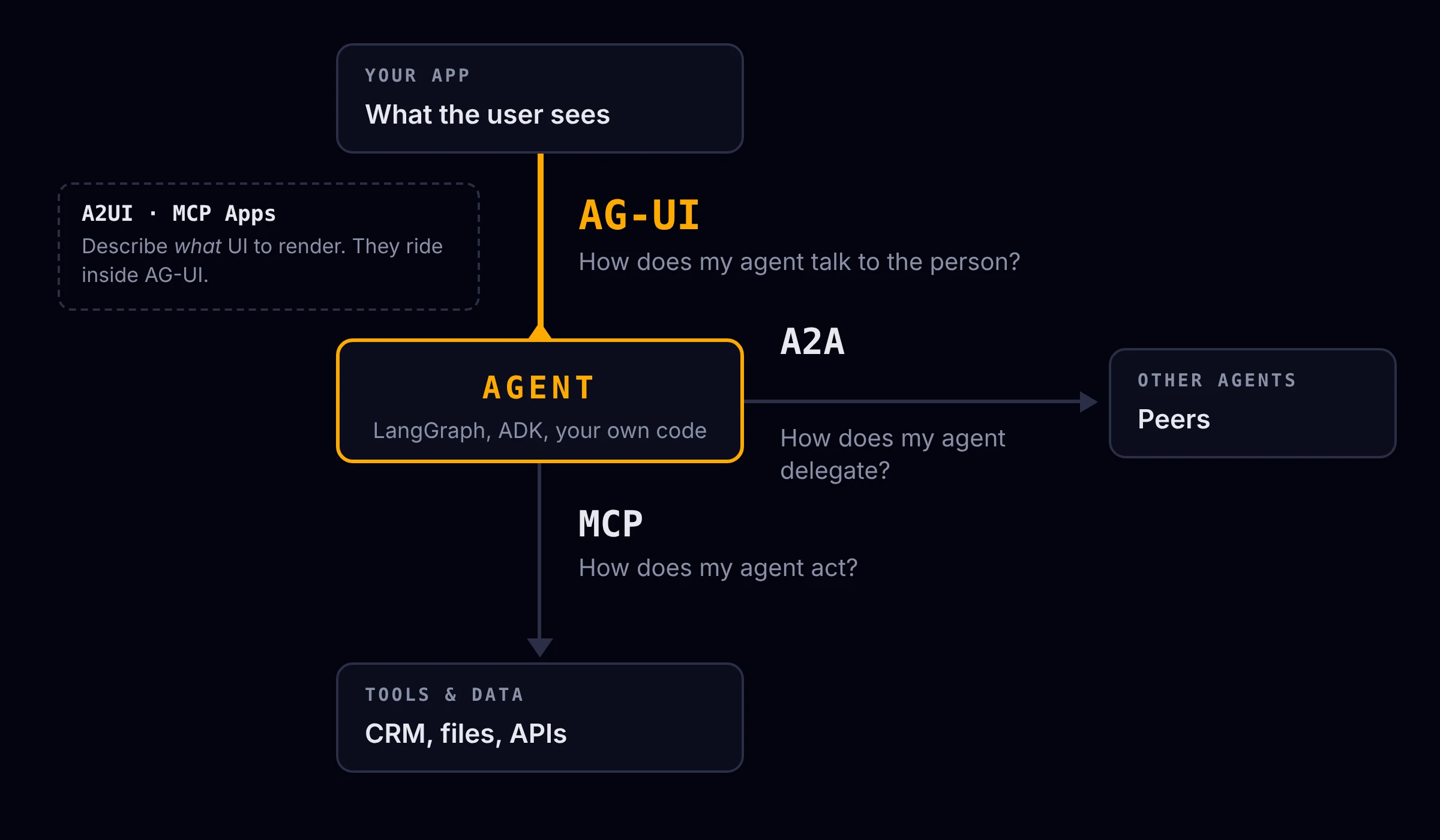
There are now a few agent protocols, and they get confused a lot. They answer different questions:
| Protocol | Connects | Question it answers |
|---|---|---|
| MCP | agent ↔ tools and data | How does my agent act? |
| A2A | agent ↔ other agents | How does my agent delegate? |
| AG-UI | agent ↔ the user's app | How does my agent talk to the person? |
| A2UI / MCP Apps | the UI payload itself | What UI should be rendered? |
A real agent often speaks several in a single run: MCP inward to call a CRM, AG-UI outward to stream its progress. AG-UI also does not tell you what the UI looks like. Specs like A2UI describe the interface, and AG-UI is the pipe that delivers it.
3. The wire format: one request in, events out
The request is a RunAgentInput. The fields that matter:
{
  "threadId": "thread-1",
  "runId": "run-1",
  "state": {},
  "messages": [{ "id": "m1", "role": "user", "content": "hi" }],
  "tools": [],
  "context": [],
  "forwardedProps": {}
}
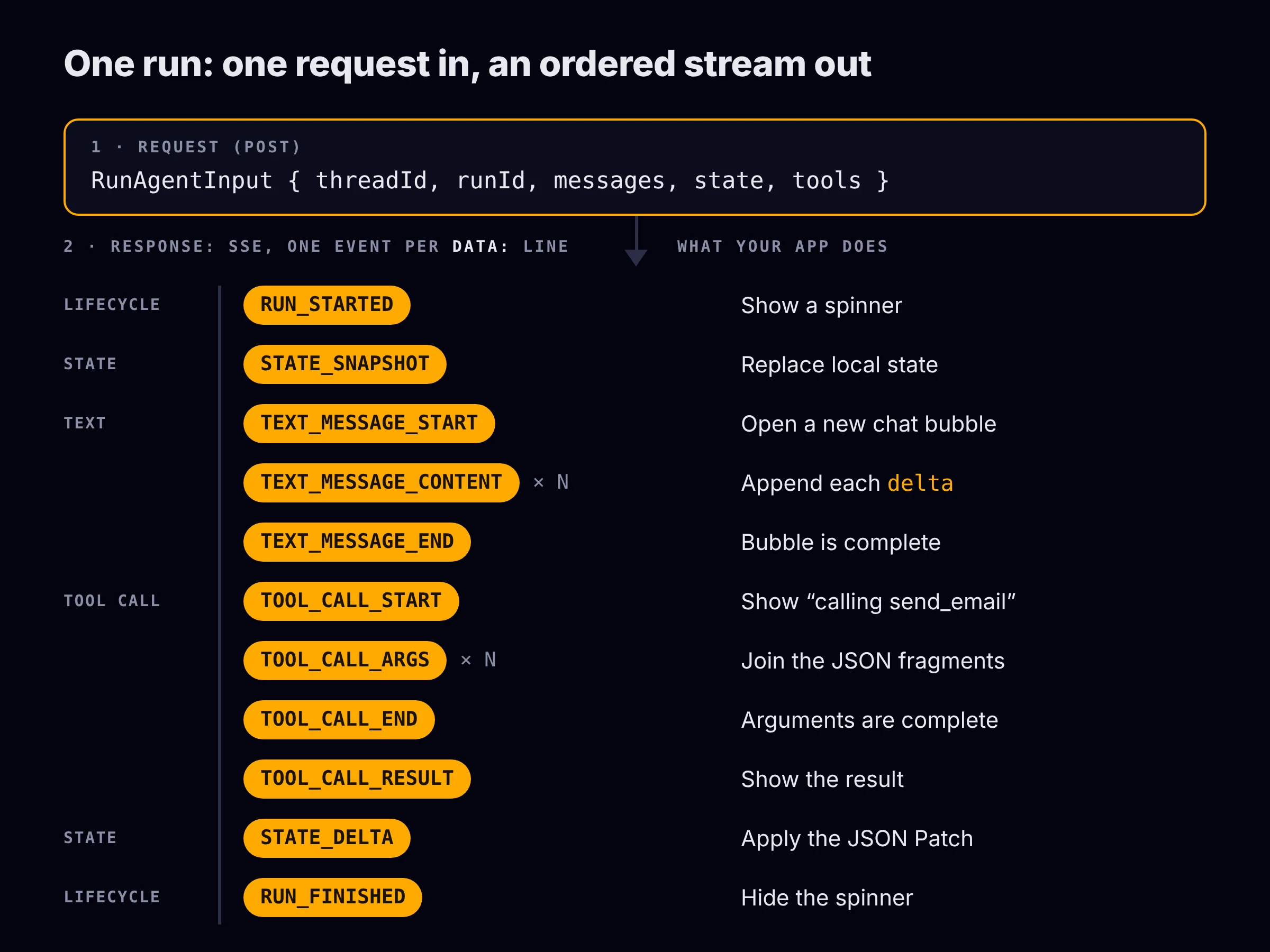
The response is an SSE stream where each data: line is one event. Here is the real output from the demo server I built, trimmed:
data: {"type": "RUN_STARTED", "threadId": "t1", "runId": "r1"}

data: {"type": "STATE_SNAPSHOT", "snapshot": {"status": "thinking", "steps": []}}

data: {"type": "STEP_STARTED", "stepName": "plan"}

data: {"type": "TEXT_MESSAGE_START", "messageId": "94fc…", "role": "assistant"}

data: {"type": "TEXT_MESSAGE_CONTENT", "messageId": "94fc…", "delta": "You "}

data: {"type": "TEXT_MESSAGE_CONTENT", "messageId": "94fc…", "delta": "said: "}
That is the whole trick. Everything else is deciding which events to send.
Two details worth knowing:
- Every run starts with
RUN_STARTEDand ends with exactly one ofRUN_FINISHEDorRUN_ERROR. That gives the UI reliable bookends for spinners and error states. - The format is transport-agnostic. SSE is the default, there is a binary option, and the docs mention WebSockets and webhooks too.
4. The event families
The docs group events into families. These are the ones you will touch first:
| Family | Events | What the UI does with it |
|---|---|---|
| Lifecycle | RUN_STARTED, RUN_FINISHED, RUN_ERROR, STEP_STARTED/FINISHED | Spinners, progress, error banners |
| Text | TEXT_MESSAGE_START → CONTENT → END | Append delta to a chat bubble |
| Tool calls | TOOL_CALL_START → ARGS → END, then TOOL_CALL_RESULT | Show "calling send_email…" |
| State | STATE_SNAPSHOT, STATE_DELTA, MESSAGES_SNAPSHOT | Keep a shared state object in sync |
| Special | RAW, CUSTOM | Escape hatches for your own events |
There are also activity events (plans, searches), reasoning events (visible summaries, which replace the older THINKING_* events that the docs list as deprecated), and subagent events that attribute output to child agents.
Three patterns repeat everywhere, and once you see them the protocol is easy to hold in your head:
- Start → content → end for anything that streams (text, tool arguments).
- Snapshot → delta for state. Send the whole thing once, then send small updates.
- Started → finished/error for anything with a lifecycle.
State deltas are plain JSON Patch (RFC 6902), so a change to one field is a few bytes instead of the whole object.
5. Build it: a server with no SDK and no API key
I wanted to see the protocol, not an LLM. So the "agent" here is a fake: it streams a canned reply word by word. The wire format is real.
The server uses only the Python standard library. First, the one function that matters, which turns an event into an SSE frame:
def sse(event: dict) -> bytes:
    return f"data: {json.dumps(event)}\n\n".encode("utf-8")
Streaming text is the start → content → end pattern:
def stream_text(message_id: str, text: str):
    yield {"type": "TEXT_MESSAGE_START", "messageId": message_id, "role": "assistant"}
    for word in text.split(" "):
        yield {"type": "TEXT_MESSAGE_CONTENT", "messageId": message_id, "delta": word + " "}
        time.sleep(0.05)  # pretend the model is generating
    yield {"type": "TEXT_MESSAGE_END", "messageId": message_id}
And a plain chat run is just a sequence of events between the two bookends:
def run_events(body):
    yield {"type": "RUN_STARTED", "threadId": body["threadId"], "runId": body["runId"]}
    yield {"type": "STATE_SNAPSHOT", "snapshot": {"status": "thinking", "steps": []}}
    yield {"type": "STEP_STARTED", "stepName": "plan"}
    yield {"type": "STATE_DELTA", "delta": [
        {"op": "replace", "path": "/status", "value": "writing"},
        {"op": "add", "path": "/steps/-", "value": "plan"},
    ]}
    yield {"type": "STEP_FINISHED", "stepName": "plan"}
    yield from stream_text(str(uuid.uuid4()), "This reply is streamed as AG-UI events.")
    yield {"type": "RUN_FINISHED", "threadId": body["threadId"], "runId": body["runId"],
           "outcome": {"type": "success"}}
Wrap that in an HTTP handler that sets Content-Type: text/event-stream and flushes after each frame, and you have an AG-UI-shaped endpoint.
6. The client: it is just a reducer
Same trick as my chat stream: fetch the body, buffer it, split on a blank line, parse each frame. A network chunk can end mid-frame, so you keep the leftover for the next read.
async function* events(res) {
  const reader = res.body.getReader();
  const decoder = new TextDecoder();
  let buffer = '';
  while (true) {
    const { value, done } = await reader.read();
    if (done) return;
    buffer += decoder.decode(value, { stream: true }).replace(/\r\n/g, '\n');
    let sep;
    while ((sep = buffer.indexOf('\n\n')) !== -1) {
      const frame = buffer.slice(0, sep);
      buffer = buffer.slice(sep + 2);
      const data = frame
        .split('\n')
        .filter((l) => l.startsWith('data:'))
        .map((l) => l.slice(5).trimStart())
        .join('\n');
      if (data) yield JSON.parse(data);
    }
  }
}
Then the UI is a switch on event.type. This is the part I like most: your frontend becomes a reducer over a stream.
for await (const e of events(res)) {
  switch (e.type) {
    case 'TEXT_MESSAGE_CONTENT':
      bubble += e.delta;
      break;
    case 'TOOL_CALL_ARGS':
      toolArgs[e.toolCallId] += e.delta;
      break;
    case 'STATE_SNAPSHOT':
      state = e.snapshot;
      break;
    case 'STATE_DELTA':
      state = applyPatch(state, e.delta);
      break;
    case 'RUN_ERROR':
      showError(e.message);
      break;
  }
}
Running it against the server prints the state evolving as events arrive:
[run run-1 started]
  state = {"status":"thinking","steps":[]}
  step: plan
  state -> {"status":"writing","steps":["plan"]}
  assistant: You said: 'hello there'. This reply is streamed as AG-UI events.
  state -> {"status":"done","steps":["plan"]}
[run finished: success]
7. Human in the loop: interrupts
This is the feature that made me take the protocol seriously. Agents that send emails, move money or delete things need a human to say yes first.
AG-UI models this without any special "pause" machinery. The run simply ends, and the final event says why:
{
  "type": "RUN_FINISHED",
  "threadId": "thread-1",
  "runId": "run-1",
  "outcome": {
    "type": "interrupt",
    "interrupts": [
      {
        "id": "int-1",
        "reason": "tool_call",
        "message": "Send email to a@b.com with subject 'Hi'?",
        "toolCallId": "tc-email-1",
        "responseSchema": {
          "type": "object",
          "properties": { "approved": { "type": "boolean" } },
          "required": ["approved"]
        }
      }
    ]
  }
}
The user decides, and the client starts a new run on the same thread that answers every open interrupt. This is the "new request" moment from the video: an SSE stream only flows from agent to app, so the answer cannot travel back up it.
{
  "threadId": "thread-1",
  "runId": "run-2",
  "resume": [
    {
      "interruptId": "int-1",
      "status": "resolved",
      "payload": { "approved": true }
    }
  ]
}
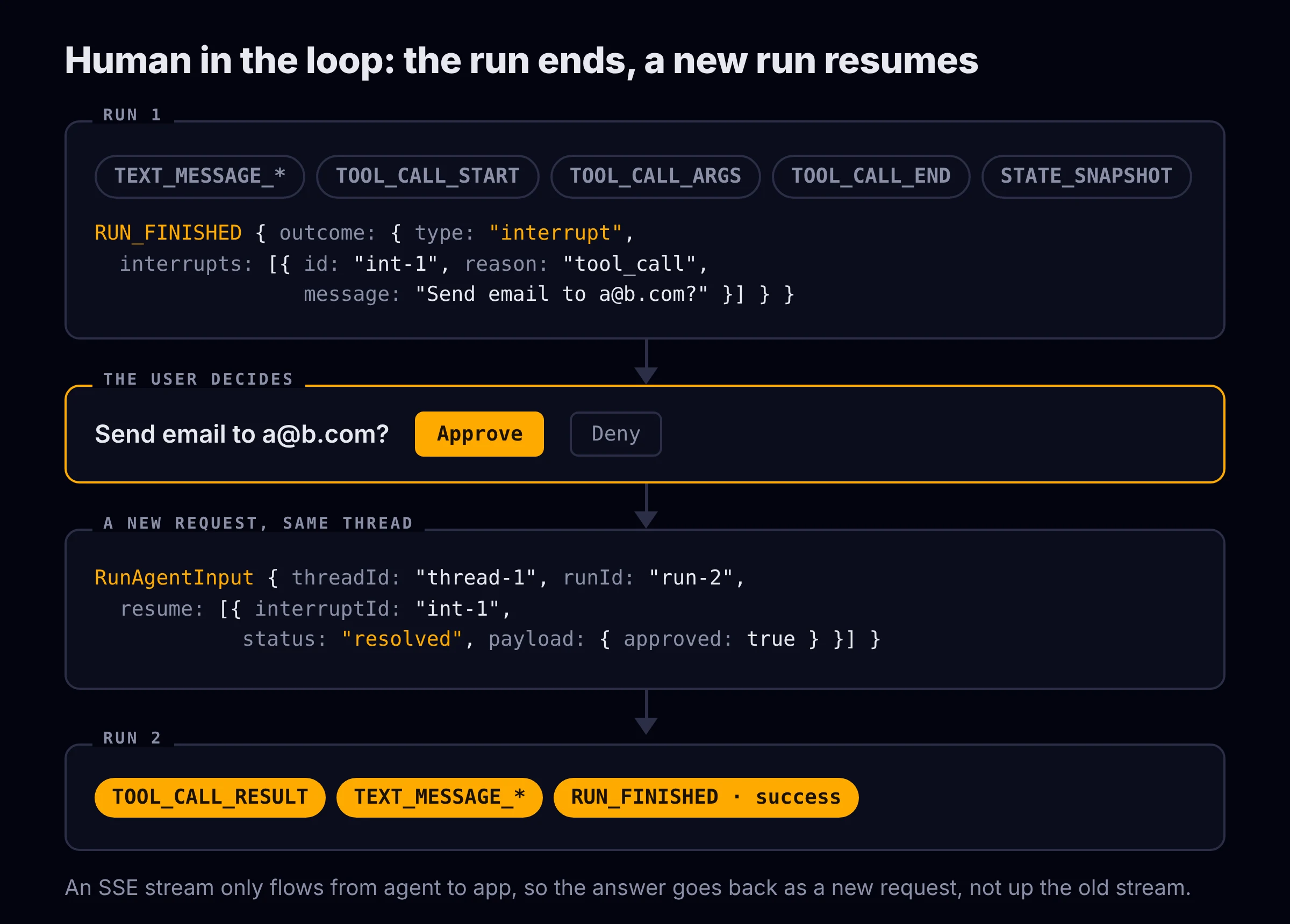
A few rules from the spec that are easy to miss:
- The resume must address every open interrupt. Partial resumes are not supported.
- Denial is expressed in the payload (
{ "approved": false }), not as a separate status.cancelledis for "the user walked away". - The agent should emit any state it needs before the interrupt, so a resume can rebuild context.
- The tool call is not repeated. Run 2 emits a
TOOL_CALL_RESULTagainst the originaltoolCallId, so the audit trail is: proposal in run 1, decision in the resume, result in run 2.
My demo handles this end to end. Approving prints:
[run run-1 started]
  assistant: I drafted an email. I need your OK before sending it.
  tool call: send_email
  args: {"to": "a@b.com", "subject": "Hi", "body": "Hello from AG-UI"}
  state = {"status":"awaiting_approval","steps":["draft"]}
[run finished: interrupt]

  ⏸  Send email to a@b.com with subject 'Hi'?
  → user approves

[run run-2 started]
  tool result: {"sent": true, "to": "a@b.com"}
  assistant: Done, the email was sent.
[run finished: success]
Denying gives {"sent": false, "reason": "user declined"} and "Okay, I did not send anything." The protocol also supports approve-with-edits, where the resume payload carries an editedArgs object that fully replaces the tool arguments.
One caveat: interrupt support depends on the framework adapter. For example, the LangGraph adapter only emits the structured interrupt outcome if you opt in, so check your integration's docs.
8. Using the real SDKs
You do not have to hand-roll any of this. There are first-party SDKs for TypeScript, Python and .NET, and integrations for LangGraph, Microsoft Agent Framework, Google ADK, AWS Strands, Mastra, Pydantic AI, CrewAI, LlamaIndex and Amazon Bedrock AgentCore, with CopilotKit as the main React client.
The two snippets below follow the official quickstarts, but I could not install the packages where I wrote this, so I have not run them. My hand-rolled server and client above are the parts I tested. Check the snippets against the SDK versions you install.
On the Python side, the SDK gives you typed events and an encoder. The code uses snake_case and serialises to the camelCase the wire expects:
from fastapi import FastAPI, Request
from fastapi.responses import StreamingResponse
from ag_ui.core import (
    RunAgentInput, EventType, RunStartedEvent, RunFinishedEvent, TextMessageChunkEvent,
)
from ag_ui.encoder import EventEncoder
import uuid

app = FastAPI()

@app.post("/")
async def run(input_data: RunAgentInput, request: Request):
    encoder = EventEncoder(accept=request.headers.get("accept"))

    async def gen():
        yield encoder.encode(RunStartedEvent(
            type=EventType.RUN_STARTED,
            thread_id=input_data.thread_id, run_id=input_data.run_id))
        yield encoder.encode(TextMessageChunkEvent(
            type=EventType.TEXT_MESSAGE_CHUNK,
            message_id=str(uuid.uuid4()), delta="Hello from the SDK"))
        yield encoder.encode(RunFinishedEvent(
            type=EventType.RUN_FINISHED,
            thread_id=input_data.thread_id, run_id=input_data.run_id))

    return StreamingResponse(gen(), media_type=encoder.get_content_type())
Note the TextMessageChunkEvent. Chunk events are a convenience: you send TEXT_MESSAGE_CHUNK and the client expands it into start, content and end for you. TOOL_CALL_CHUNK does the same for tool calls.
On the client, HttpAgent from @ag-ui/client replaces my hand-written parser and gives you a callback per event type:
import { HttpAgent } from '@ag-ui/client';

const agent = new HttpAgent({ url: 'http://localhost:8000' });
agent.messages.push({
  id: crypto.randomUUID(),
  role: 'user',
  content: 'hello',
});

await agent.runAgent(
  {},
  {
    onTextMessageContentEvent({ event }) {
      process.stdout.write(event.delta);
    },
    onToolCallStartEvent({ event }) {
      console.log('tool:', event.toolCallName);
    },
  },
);
9. Gotchas worth knowing
- Model output is untrusted input. The spec says so explicitly: tool arguments, tool results and streamed content cross a trust boundary, and apps must not render streamed content as executable markup. Same lesson as my chat: render text as text, never as HTML.
- State round-trips. State and messages go to the client and come back on the next run, so do not put secrets in them.
- Check the version. AG-UI is at 1.0, with a 1.1 draft in progress. Make sure every
@ag-ui/*package in your app is on the same major version, because two copies means two incompatible event types. - It is a communication layer, not a UI library. AG-UI will not render anything for you. For a background batch job with nobody watching, it adds complexity for no benefit.
What's next
I like this protocol because it is small enough to hold in your head. A handful of event families, three repeating patterns, JSON over SSE. If you already know how to stream tokens to a chat bubble, you already know most of it.
So far the agent has only sent text, tool calls and state, and the UI decided how to show them. In Part 2 the agent starts choosing the interface too: a weather card, a form it invented, a whole widget. That is where the interesting design trade-offs are.
The code for this part (server.py and client.mjs, no dependencies) is in this GitHub Gist.